Enlisted Pro Tool | Aim Lab, Virtual Shooting Range & Sensitivity Calibration v1.0
Hello everyone!

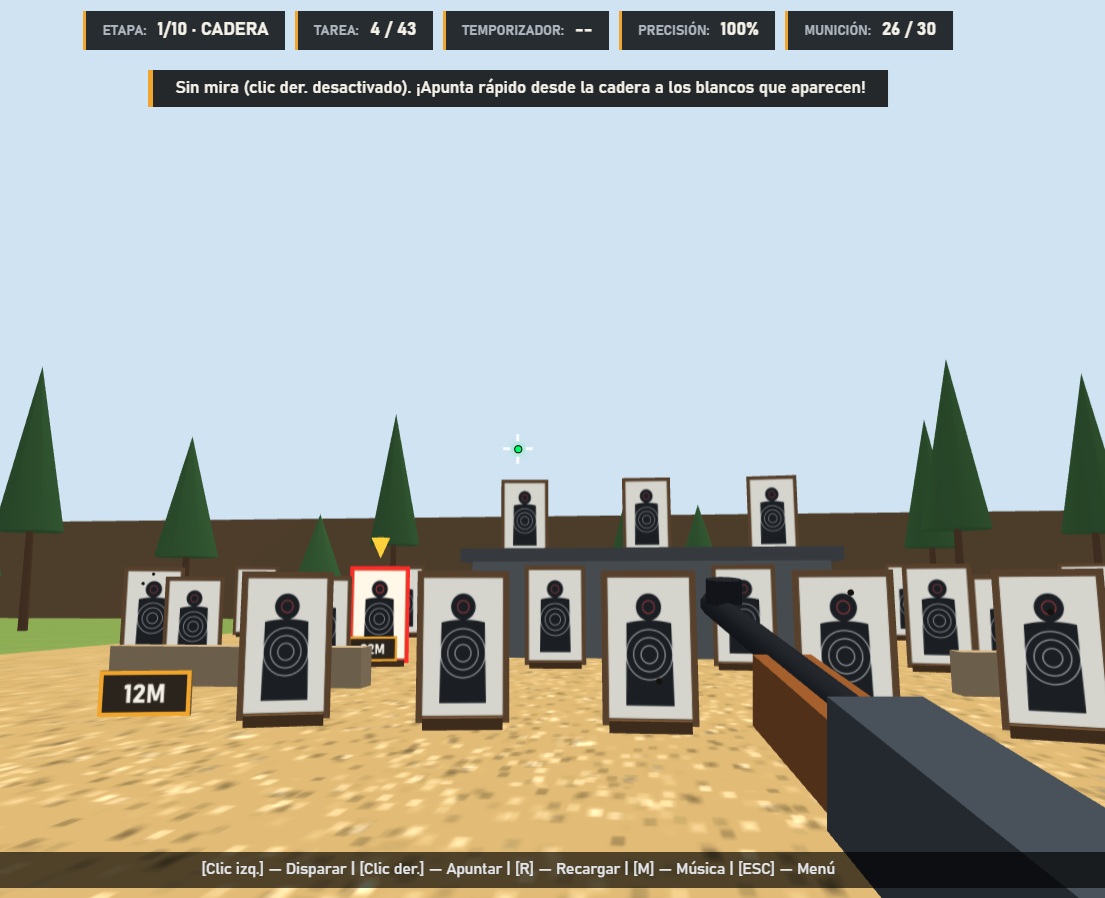
I’d like to introduce Enlisted Pro Tool, a standalone training range designed for players of Enlisted and Active Matter who want to improve their mouse control, practice aiming and experiment with sensitivity settings.
You should open this
https://enlistedaimlab.vercel.app/
GitHub link:
This is more than just a shooting range with targets popping up on the screen. It features multiple training formats, difficulty levels, weapon profiles, sensitivity settings and tools for comparing your results.
The project supports both Enlisted and Active Matter , with dedicated game profiles and settings.
The entire interface is available in both English and Russian. You can switch between languages directly using the built-in language selector.
 What’s included?
1. Three Training Formats
- Full · 10 Stages — a complete training session covering the main exercises. Designed for a comprehensive skill check.
- Fast · 6 Stages — a shorter session for a quick warm-up or a fast performance check.
- Trainer · 20 Pop-Out Targets Rush — a separate reaction and aiming challenge. Twenty targets, limited time, and no room for hesitation.
2. Three Difficulty Levels
- Soldier — a relaxed mode without a timer. Focus on accuracy and technique.
- Veteran — time limits and moving targets. You’ll need to react faster.
- PRO — shorter reaction windows and faster target appearances. Designed for players looking for a greater challenge.
3. Training Exercises
The training program includes several types of exercises:
- Hipfire Flicks — hip-fire aiming.
- 180° Turns — quick turns and target acquisition.
- ADS Flicks — aiming down sights.
- Trench / Cover — engaging targets from cover.
- Micro Corrections — fine aim adjustments.
- Vertical Aim — vertical aiming.
- Tracking — following moving targets.
- Recoil Control — managing recoil.
- Spray Transfer — transferring fire between targets.
The goal isn’t simply to rack up hits. It’s about identifying your mistakes and understanding what needs improvement.
4. Weapon Profiles
Separate weapon profiles are available for training.
The Enlisted profile currently includes:
- StG 44
- BAR M1918A2
- Fedorov Avtomat
- MP 40
- PPSh-41
Active Matter also has its own dedicated game profile and settings.
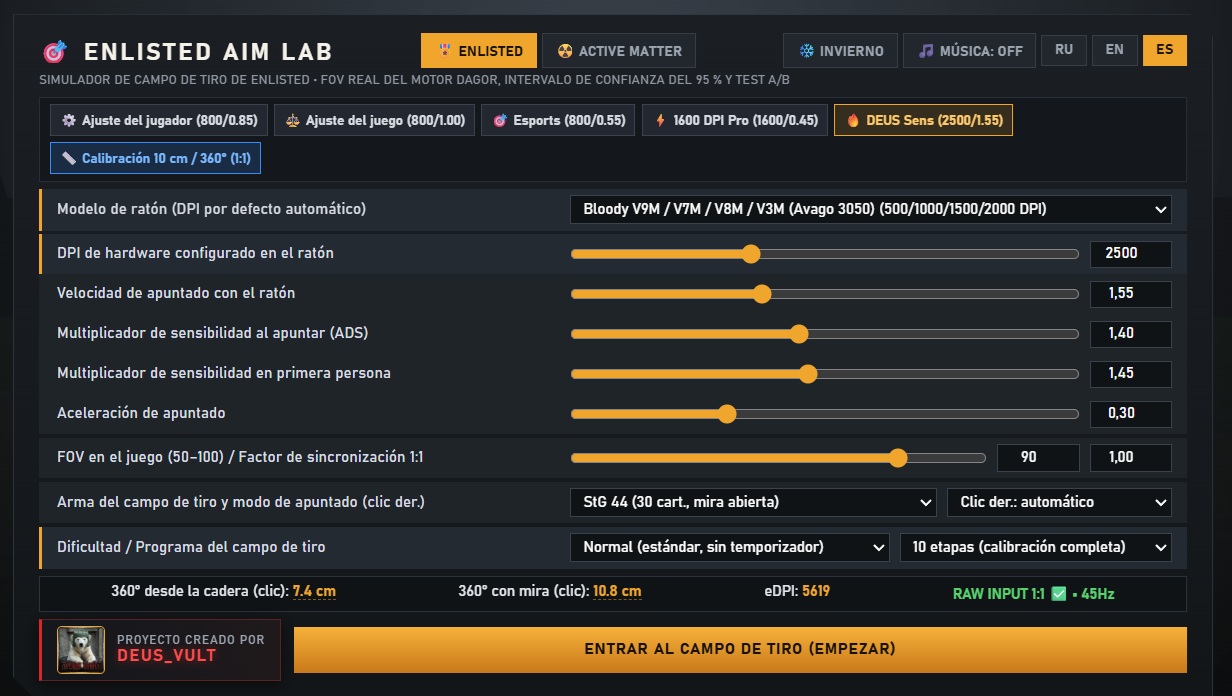
5. Sensitivity Settings
You can configure the main input parameters:
- Mouse DPI;
- Base sensitivity;
- ADS multiplier;
- First Person multiplier;
- Mouse acceleration;
- FOV;
- 1:1 synchronization factor.
Several presets are available, including Player Default, Game Stock, Pro Low, 1600 DPI Pro and DEUS Sens.
The tool also includes a mouse model database and an option to enter a custom mouse model.
6. 1:1 Sync Mode
A dedicated tool for manually calibrating sensitivity.
It consists of three stages:
- DPI verification using a 10 cm ruler test.
- Measuring a full 360° hip-fire turn.
- Measuring a full 360° ADS turn for the selected weapon.
You can adjust the results directly during the calibration process.
7. Blind A/B Sensitivity Test
One of the more interesting features.
Instead of endlessly changing sensitivity settings by guesswork, you can compare several options using a blind test.
The system randomly selects one of three sensitivity multipliers:
- ×0.92
- ×1.00
- ×1.08
After completing the tests, you can compare hit rate, median time and statistical results.
For a more meaningful comparison, at least 25 flick tests per option are recommended. More trials generally provide more useful statistics.
8. Results & Statistics
After a training session, you can review the main performance indicators:
- Accuracy;
- Movement time;
- Total time;
- Tracking performance;
- Overshoots and undershoots;
- Timed-out targets;
- Recoil control.
You can also generate a PNG results card.
 Winter Map Mode
The range also features a winter map mode. You can enable it using the dedicated WINTER button.
A small detail that adds a bit of atmosphere to your training sessions.
 Music
The range features a musical soundtrack:
Sergei Prokofiev — Dance of the Knights.
You can toggle the music on or off by pressing M.
 Easter Egg
And finally, a little Easter egg.
When starting a training session, pay attention to the opening hint. Look up, find the Sun and shoot at its center.
I won’t spoil the surprise by explaining everything. 
 Controls
| Key | Action |
|---|---|
| LMB | Fire |
| RMB | ADS |
| R | Reload |
| M | Music |
| ESC | Return to menu |
The tool uses mouse pointer locking for proper aiming controls. Raw Input is supported when available through the browser and operating system.
 Language Support
The entire project has been translated into both English and Russian. A built-in language selector allows you to switch the interface language directly in the application.
 Important Notes & Disclaimer
This is an early, unfinished release build. The tool is still under development, so its current features and measurements should not be considered final.
Sensitivity calibration in particular has not yet been perfected. The current results are intended as a starting point rather than an exact representation of in-game values. You can further fine-tune your sensitivity yourself using the available internal tools and settings.
One very important thing: before experimenting, take screenshots of your current sensitivity settings in both Enlisted and Active Matter. Save your DPI, base sensitivity, ADS and other relevant values. This will help you restore your usual settings if you accidentally change or lose them during testing.
Please also keep the following in mind:
- This is a standalone browser-based simulation, not an integrated Enlisted or Active Matter game mode.
- Weapon behavior and shooting results in the simulator are not guaranteed to match the actual in-game mechanics perfectly.
- Recoil, aiming and shooting measurements should be treated as training references.
- A/B test history is stored locally in your browser. Clearing website data may erase it.
- For reliable sensitivity comparisons, try to keep testing conditions consistent and avoid changing multiple parameters at once.
- Raw Input requires browser support. If it is unavailable, the tool falls back to standard input handling.
Constructive feedback, bug reports and suggestions for future improvements are always welcome.
Give it a try, compare your results, experiment and share your feedback!
https://enlistedaimlab.vercel.app/

 Spanish Language Added!
 Русский
 English
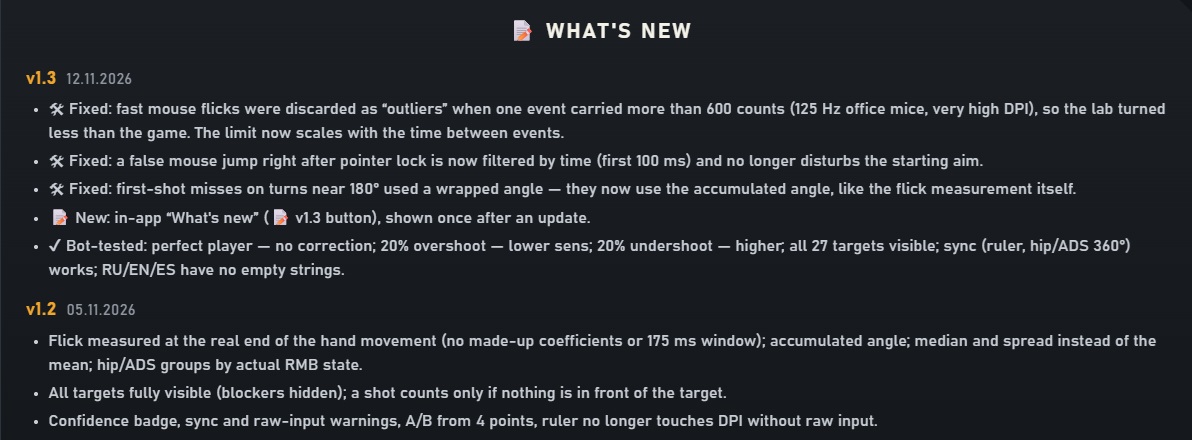
 UPDATE RELEASED!
 What’s new?
 How to use it

 Download / Project repository
