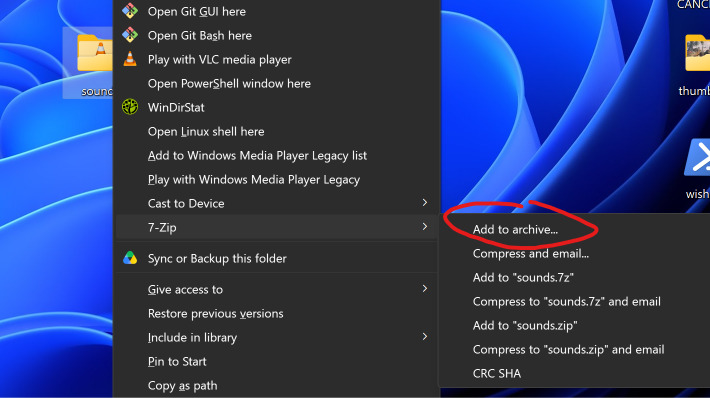
If you have 7-zip installed, you can right click on the folder, (click on “Show More Option” if you are on Windows 11), then move your cursor to the 7-Zip tab, and click Add to archive.
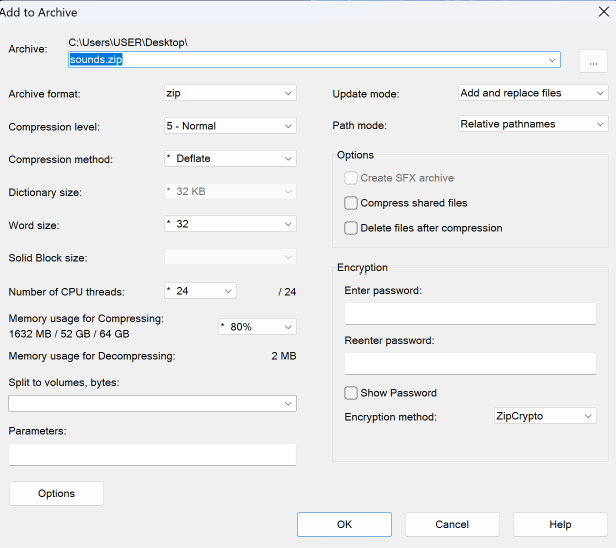
In the popup window, you keep everything at default and just press OK to compress
It work , Thanks you all for you’r help !
1 Like
My Mods Sounds Pack its available
1 Like
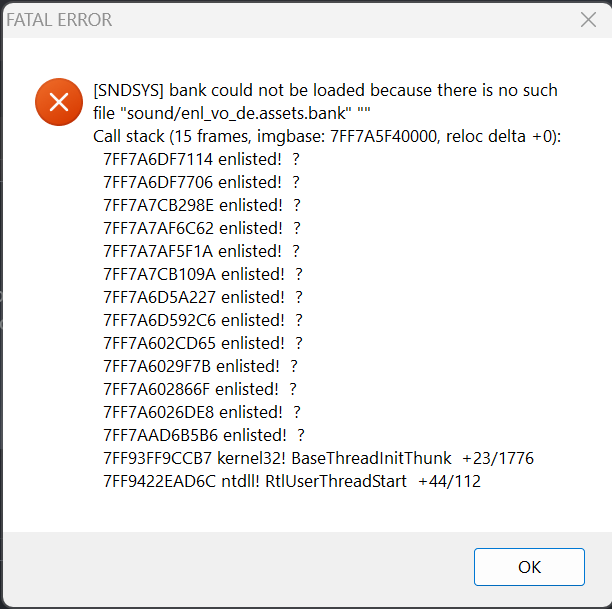
I downloaded the mod and installed it. When I launch the game, I get an error and the game crashes.
Do not install sound mods and/or attempt to modify game files to do so. It is currently down for maintenance for a reason
You probably replaced the base game’s file to try to install the sound mod, which is not how you do it in Enlisted. Normally you create a folder called “mod” in /sound/ folder, and then you place your modded sound banks inside.
Do not, at any circumstances, replace the files of the game - the anti-cheat can treat this as an attempt in messing with the game’s integrity and get you flagged/banned for trying to cheat.
(You cant blame anyone if that happens, since the documentation developers provide did tell you how to correctly use sound mods, when they were enabled)
Thanks, I didn’t know about that.
1 Like