- Yes
- No
0
voters

Warthunder has this epic feature https://www.youtube.com/watch?v=C9iAMGgaazc
Any ideas when we can add this to enlisted? Be nice to keep the sensitivity options when you are switching from PC to PC
Warthunder has this epic feature https://www.youtube.com/watch?v=C9iAMGgaazc
Any ideas when we can add this to enlisted? Be nice to keep the sensitivity options when you are switching from PC to PC
Why do some people always vote no? I mean it’s literally a useful tool. 
This is Enlisted, not War Thunder. You can explain its functionality instead of just copying its screenshots, because you need to know that Enlisted and War Thunder are competitors, not partners.
You can copy the configuration file manually.
watch the video I linked please
Please explain how?
Oh, this is highly classified, top-secret knowledge, but so be it - I’ll share it with you.
First, you need to find the folder where the game is installed. In my case, it’s drive F => Games folder => Enlisted folder.
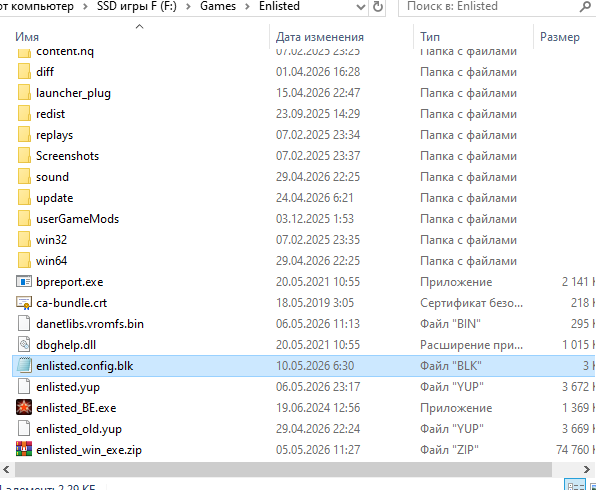
Then go into the Enlisted folder and look for the file enlisted.config.blk.
That’s your game settings, much rejoicing!
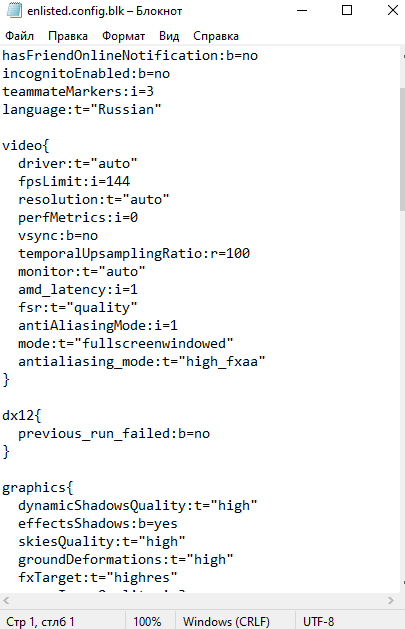
This is for your options, so this doesn’t include sensitivity and other keybinds
However there is still a way to copy/get a backup of your keybinds
C:\Users\{username}\AppData\Local\enlisted\downloads\online_storage\{gaijin_id}\enlisted\jupiter
C:\Users\{username}\AppData\Local\enlisted\downloads\online_storage\last\enlisted\jupiter
These folders have controls.json which contains all your keybinds
When you want to restore your settings, you need to change the controls.json for both folders, and when you open it there is a line about the version, just increase the number by 1
woo hoo thanks